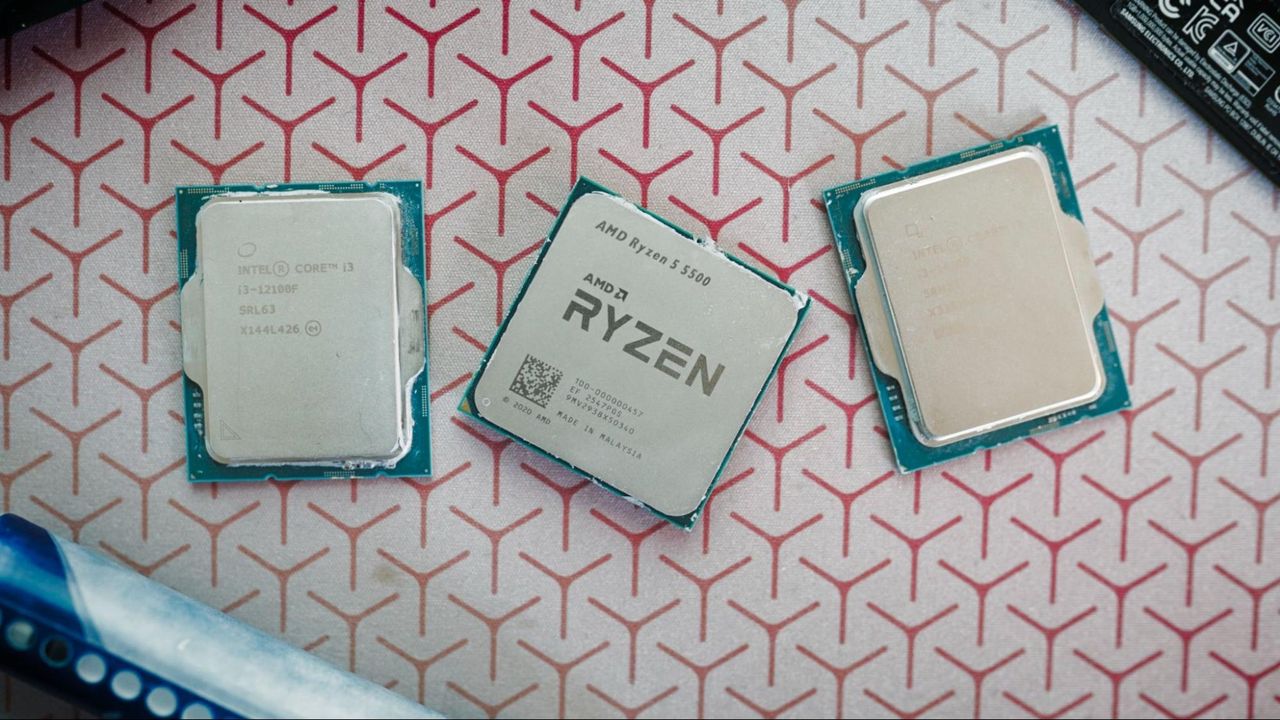
$100 CPU Shootout: Comparing the Ryzen 5 5500, Core i3-14100F, and Core i3-12100F to find the top DDR4 CPU
As RAM prices continue to climb, budget CPUs are becoming more important. Here, we look at the three leading CPUs around $100 that use DDR4 memory to find which one is right for your next budget PC build.
$100 CPU Shootout: Comparing the Ryzen 5 5500, Core i3-14100F, and Core i3-12100F to find the top DDR4 CPU | Tom's Hardware
Skip to main content
Unlock world-class roadmaps & trusted Bench data. See More
× Unparalleled insights. Industry analysis. Insider access. Tom's Hardware Premium equips you with world-class coverage and detailed insights into the evolving hardware landscape.
✓Full access to our trusted Bench database: Access granular performance data instantly. ✓Exclusive hardware roadmaps: Peer into the future of the hardware industry. ✓Daily news analysis: Dive deep into the biggest stories.
Subscribe to our annual plan for just $29
Jump to:
Specs and Features
Gaming Performance
Productivity Performance
Power and Efficiency
Pricing and Platform Considerations
Choosing a Winner
Stay On the Cutting Edge: Get the Tom's Hardware Newsletter Get Tom's Hardware's best news and in-depth reviews, straight to your inbox.
Contact me with news and offers from other Future brands
Receive email from us on behalf of our trusted partners or sponsors
By submitting your information you agree to the Terms & Conditions and Privacy Policy and are aged 16 or over.
You are now subscribed Your newsletter sign-up was successful
An account already exists for this email address, please log in.
(Image credit: Tom's Hardware)
Jump to:
Specs and Features
Gaming Performance
Productivity Performance
Power and Efficiency
Pricing and Platform Considerations
Choosing a Winner
Copy link
X
Share this article
11
Join the conversation
Follow us
Add us as a preferred source on Google
Newsletter
Subscribe to our newsletter
If you want to buy a CPU for $100 today, you have three options. There’s AMD’s Ryzen 5 5500 at $80, alongside Intel’s Core i3-12100F at $90 and Core i3-14100F at a clean $100. Of course, you can go back in time to pick up something like the Core i7-6700 or Ryzen 3 4100, but if you’re after the best CPU for gaming, those chips won’t cut it. I wanted to see how much performance you could get out of a chip for $100, brand new, without mucking around eBay or dusting off DDR3 DIMMs.Although AMD and Intel have mostly abandoned the sub-$150 price point with newer generations, it’s still a popular segment among budget builders. That’s evidenced by the fact that the Ryzen 5 5500 is (and has been for months) the second best-selling CPU on Amazon. And despite being much lower in the rankings, Intel’s Core i3-12100F ranks higher on that chart than the newer Core Ultra 5 250K Plus.This segment has only become more important over the past six months, as well. Rising SSD and RAM costs, along with GPU shortages, have bloated the price of building a PC. These chips not only represent a cheap entry point into a relatively modern PC, they also represent a big cost-savings with memory; all three CPUs support DDR4, which is about half as expensive as a kit of DDR5 right now.Latest Videos FromWe put all three chips through our full gauntlet of benchmarks, as featured in our CPU reviews, to see how they stack up to each other. The goal here is to look at the entry point for building a PC today, taking into account the full cost of a build. You can bump up your budget and get a much better CPU, such as the Ryzen 5 7600X, but that carries with it the baggage of DDR5 prices. We’re capping the budget at $100 to truly segment what the state of entry-level CPUs looks like in 2026.To that end, we’re mainly comparing these CPUs to each other. In our testing below, we’ll call out some neighboring chips at the budget end of the market, but we’re really focused on our three main test subjects. We evaluate all aspects of the chips as they relate to each other more so than the broader market that starts to pick up closer to the $200 price point. If you want to see more comparisons, make sure to look at our CPU benchmark hierarchy.$100 CPU Shootout: Specs and Features$100 CPU Shootout: Specs and FeaturesSwipe to scroll horizontallyRow 0 - Cell 0 ArchCores / ThreadsBase / Boost Clock (GHz)Cache (L2 / L3)TDP / PPT or MTPMemoryRyzen 5 5500Zen 36 / 123.6 / 4.219 MB (3 + 16)65W / 88WDDR4-3200Core i3-12100FAlder Lake4 / 83.3 / 4.317 MB (5 + 12)58W / 89WDDR4-3200 / DDR5-4800Core i3-14100FRaptor Lake Refresh4 / 8 3.5 / 4.717 MB (5 + 12)58W / 110WDDR4-3200 / DDR5-4800The Ryzen 5 5500 and Core i3-12100F are both from 2022, and the Core i3-14100F is from 2024, but the specs for these CPUs feel ripped straight out of 2015. We have two quad-core Intel chips with relatively high boost clocks facing off against an AMD hexa-core chip, and despite AMD packing more cores, it has the cheapest price of the three CPUs in our lineup at only $80 on sale.Architecturally, the Ryzen 5 5500 is the most dated CPU here, packing six Zen 3 cores that originally debuted in late 2020. However, it doesn’t come from the Vermeer range like most other Ryzen 5000 CPUs. Rather, it falls under the Cezanne codename for Ryzen 5000 APUs, and in particular, the Ryzen 5 5500 lives in a small lineup of those APUs with the integrated graphics disabled. Vermeer and Cezanne are identical when it comes to the node and architectural design. However, Cezanne only supports up to PCIe 3.0, while Vermeer supports PCIe 4.0.Stay On the Cutting Edge: Get the Tom's Hardware NewsletterGet Tom's Hardware's best news and in-depth reviews, straight to your inbox.Contact me with news and offers from other Future brandsReceive email from us on behalf of our trusted partners or sponsorsOutside of the PCIe limitation, the Ryzen 5 5500 is a familiar Zen 3 CPU. It comes with a relatively large L3 cache at 16 MB, and you’ll find 512 KB of L2 cache per core. Power demands are low with a 65W TDP and PPT of 88W, and the chip comes bundled with AMD’s Wraith Stealth cooler, which is enough to keep the chip within normal operating temperatures. It exclusively supports DDR4 memory, with official speeds up to 3,200 MT/s, and it slots into AM4 motherboards. As usual with AMD’s long-standing AM4 support, you should check compatibility with your motherboard; the Ryzen 5 5500 is technically supported on 500- and 400-series chipsets, and even some 300-series chipsets, but support varies from board to board. You will likely need an older AM4 chip to flash a BIOS update, as well (short of BIOS Flashback features available on some boards).The Core i3-12100F and Core i3-14100F are both similar chips, leveraging the same silicon with minor modifications. Starting with the Core i3-12100F, it’s a quad-core chip from Intel’s Alder Lake range. Unlike other 12th-gen CPUs, however, it doesn’t come with a hybrid architecture. It comes with four Golden Cove P-cores and no E-cores, giving you access to a total of eight threads.Although the Core i3-14100F is two generations newer, it uses the same die with H0 stepping as the Core i3-12100F, just with higher boost clocks and a more aggressive MTP, along with elevated base clocks. Both chips come with a pool of 12 MB of shared L3 cache, along with 1.25 MB of L2 cache per core, totaling 5 MB across the chip.Both chips are compatible with LGA 1700 socket motherboards, including 600- and 700-series chipsets, though you may need a BIOS update to use the former. Both chips also support DDR4 and DDR5 memory given you have a compatible motherboard. DDR4 and DDR5 are physically incompatible, so make sure you have the proper motherboard version before picking out your memory.Like AMD, Intel offers a bundled cooler with both chips: the Laminar RM1. Given the low power demands and locked multiplier, the RM1 is enough to keep both chips within operating temperatures. However, Intel’s 12th- through 14th-gen chips tend to run hot, so investing in an inexpensive tower cooler ($20 - $30) is worth it. Unlike the Ryzen 5 5500, both Intel chips support PCIe 4.0 for storage and graphics.We’re looking at the F-series variants of the Core i3-12100 and Core i3-14100 without integrated graphics, which are the versions you’ll still find available for around $100. The pricier versions with integrated graphics perform identically, though they’re way too expensive to recommend right now with resellers asking north of $220 for them.$100 CPU Shootout: Gaming Performance$100 CPU Shootout: Gaming PerformanceWhen we review CPUs at Tom’s Hardware, we use the most performant gaming GPU available to consumers in order to isolate CPU performance as much as possible — that’s currently the Nvidia RTX 5090 FE. This approach has a flaw when we’re looking at CPUs as weak as the Ryzen 5 5500, Core i3-1200F, and Core i3-14100F, however. We are forcing the system into a full CPU bottleneck and ignoring the influence of the GPU in a budget system running one of these chips, which is an influence that we need to account for in this situation.Performance with the RTX 5090 FE is important, as we’ve isolated CPU performance as much as possible to get an accurate view of how these chips compare to one another. However, we also ran a test pass with an Asus Dual RTX 4060 8GB as a more grounded, “real-world” comparison point. The choice to use the RTX 4060 was deliberate, as it only has 8GB of VRAM, and some of the games in our test suite have performance issues with 8GB graphics cards. If you’re buying one of these CPUs, there’s a good chance you’re pairing it with a GPU that has 8GB (or less) of VRAM, so we wanted to reflect that situation in our testing.
(Image credit: Tom's Hardware)You can see both configurations represented in our chart above, with a natural split between the RTX 5090 and RTX 4060. We’re te
📰Originally published at tomshardware.com
Staff Writer