Fitbit Air review: Health tracking for the AI generation
The Fitbit Air is a serious rival to Whoop and other screenless wearable trackers thanks to its solid hardware, comprehensive software and competitive pricing.
Fitbit Air Review: Health Tracking For The AI Generation
Reviews
Wearables Fitbit Air review: Health tracking for the AI generation Google has brought some serious competition to Whoop (and other screenless wearable trackers). By Cherlynn Low May 26, 2026 9:00 am EST Cherlynn Low for Engadget RATING : 8.8 / 10 Pros
Lightweight, versatile hardware
Fast charging
Comprehensive and easy-to-use app Cons
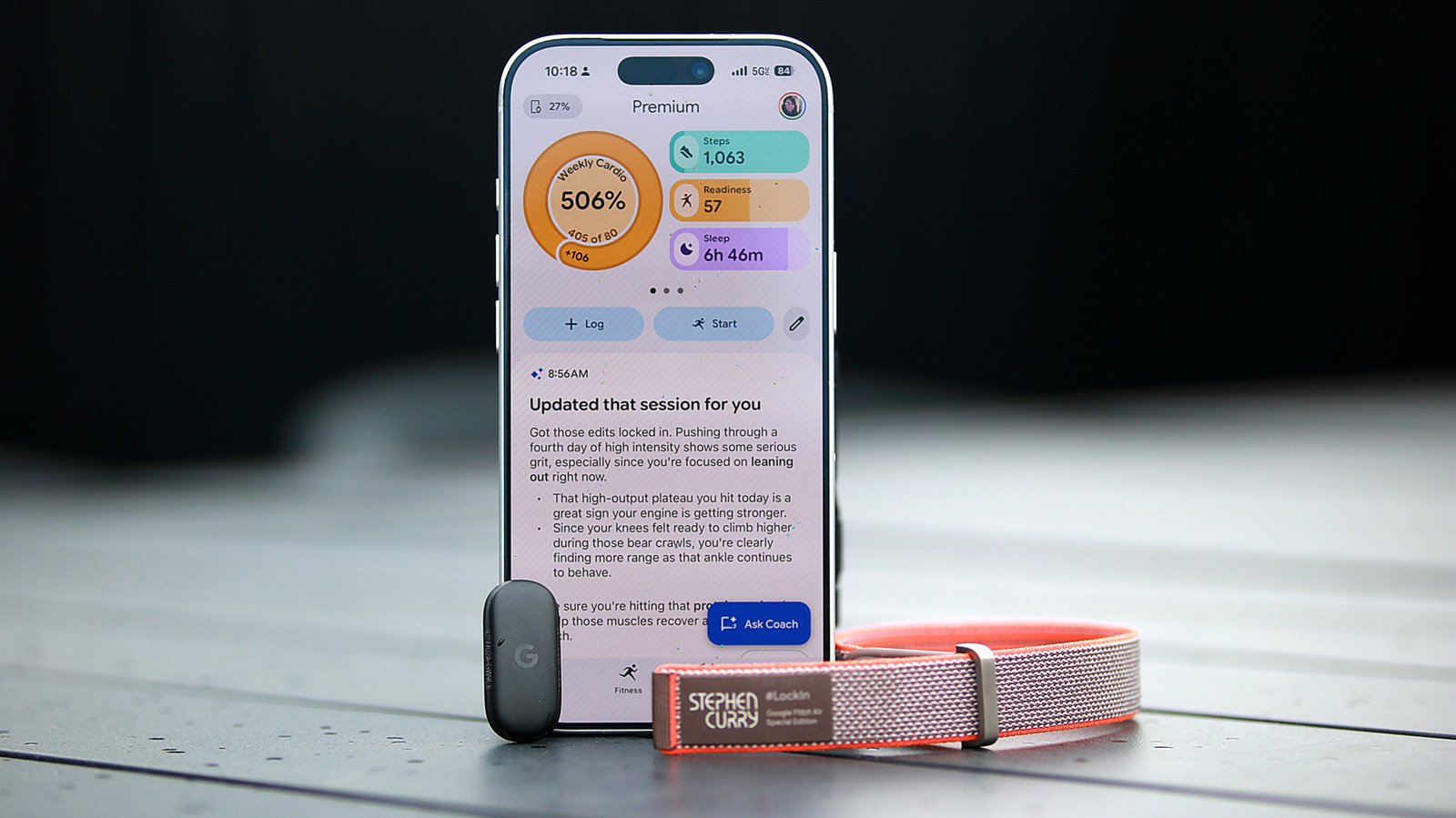
AI can be glitchy "You clearly didn't get the memo about taking it easy today." That was the headline to the summary of a workout I had logged in the new Google Health app. Minutes later, it was replaced with something less... aggro. "Adjusted your HIIT session details," it said, before going on to detail my workout and contextualize the metrics. Earlier that morning, I had been told by the AI Coach that my readiness score was a mere 48 (out of 100), after a long, stressful day prior resulted in my getting a lousy night's sleep. I finished my 54-minute HIIT class at 9AM, spending 41 minutes in vigorous cardio zones and reaching a peak heart rate of 169 bpm, so I could see why I was admonished. The AI's chiding didn't hurt my feelings; in fact, I got a kick out of it and told people "my Fitbit yelled at me." Aside from the Gemini-powered coach and the fact that it's a screenless wearable you can easily drop in a variety of bands, the Air isn't very different from your average Fitbit. It is a thinner, lighter version of the Inspire 3, and since the Google Health app is set to replace the Fitbit app anyway, owners of the company's older activity trackers may get to experience much of what's new soon. Despite that, it's easy to see why the Fitbit Air is an intriguing device. It's a fairly obvious attempt to recreate a Whoop, which first launched a screenless wearable in 2015. In March this year, Whoop raised $575 million, which put the company's valuation at a whopping $10 billion. There's clearly plenty of interest in the category, not just from Silicon Valley and investor-y types, but also among people looking to pay closer attention to their health. Since it doesn't have a display, most of the Fitbit Air experience revolves around the Google Health app and AI Coach. I'll spend a portion of this review evaluating the device itself, and a lot of it discussing the software at the heart of it all. The Fitbit Air's hardware Cherlynn Low for Engadget I've described the Fitbit Air as basically one of the company's Inspire trackers freed from its strap. When I saw the Air next to an Inspire 3, I felt validated. The two have the same pill shape, and unless you see them side by side, you might miss that the Inspire is noticeably thicker. Of course, the Inspire 3 also has a screen, but it otherwise tracks more or less the same things the Air does, and can even be removed from its strap so you can place it in a clip for your belt, waistband or bra. At 34.9 x 17 x 8.3 mm (1.37 x 0.66 x 0.32 inches) and 5.2 grams (0.18 ounces) without a band, the Air is tiny and light. It has a Google logo on the top, its sensor array on the bottom and an LED light on the edge. Setting it into one of the three straps Google sent was easy enough, as was popping it out whenever I wanted to switch bands. I basically left the Steph Curry version by my door, which made swapping between my at-home and outside setups very convenient. (Yes, I have designated indoor and outdoor bands because hygiene.) I wish the bands were narrower, like the one for the Inspire 3 (about 14mm wide), but otherwise they felt comfortable enough. The "performance loop band," in particular, is probably the least obtrusive, although I do find it a bit hard to secure due to the way the velcro strap is set up. The Air is narrower than the Whoop MG, which has a more squarish shape. Although I still detest wearing anything on my wrist to bed, I'd say the Fitbit Air came very close to being comfortable enough to sleep with, while the Whoop looked a bit too big for me. The only means of interacting with the Fitbit Air at all is by tapping it twice, firmly, on the surface. You can do this to dismiss alarms or to prompt the LED on its edge to light up and indicate how much battery is left. Speaking of alarms, there's a vibration motor onboard that allows the Air to silently wake you up. If you enable Smart Alarm, it can gauge, within a 30-minute window, when it might be optimal to buzz you awake based on your sleep stages. I'll get to the rest of the Air's features below, as they're almost entirely accessible within the Google Health app. One thing I'll note that's specific to the device is battery life. Like many other Fitbits, the Air is supposed to last about a week. While the ten or so days I've had with a review unit hasn't been enough to establish a baseline, I can say that so far seven days is a fair estimate, especially if you don't mind letting power levels go down to zero. On average, the Air's battery level drops by about 15 percent each day I've worn it, and that's including overnight sleep tracking. That runtime feels a little short for something without a screen, and is half of the 14 days that Whoop promises with its current-gen products. My gym buddy, who uses the Whoop MG, says he consistently gets two weeks on a charge. When he's running low on power, he's found the company's attachable wireless battery pack a convenient way to recharge without having to remove his Whoop. Though Google doesn't offer a similarly handy power accessory, it does deliver impressive charging speeds. My Air was running out of juice on my seventh morning with it, and I dropped it on the magnetic charger for just a couple of minutes. That was enough to bring me out of the sub-20-percent danger zone. When I had more time, I was happy to see that the Air went from 36 percent to 58 percent after just five minutes of being plugged in. The Google Health app and Gemini-powered Coach Screenshots Google unveiled the AI Coach and a redesign of the Fitbit app in August, but this month announced it will completely replace its existing wellness apps with Google Health. That means that those who use Google Fit will be asked to install the new app and migrate their data, while those who currently have the Fitbit app will see a rebrand. Since the interface is quite different from even the fairly recent redesign in 2023 and the August overhaul is just now coming out of public preview, I thought I would evaluate its performance. Compared to older iterations of the Fitbit app, the first difference longtime users might notice is the layout of information on the home (or Today) page. Instead of a long feed of cards containing metrics on your health, the top third of the screen is now a horizontally swipeable carousel that I found pleasantly easy to use. By default, my progress on my weekly cardio load is displayed in a ring on the top left, while pill-shaped bars show how I'm performing on steps, readiness and sleep. Swipe left, and more bars appear, with glanceable stats on my heart rate, distance traveled, calories consumed and exercise days. Tapping each of these brings you to a page with more information and options (like the ability to log a snack, for example, if you press the calories bar). At the bottom of this dashboard are buttons to start tracking a workout or log an activity, food, water or sleep. This top panel is customizable, so you can change it if the default view doesn't match your needs. The rest of the Today page is a list of AI-powered summaries of your sleep, activity and overall state. In general, I found the redesigned app easy to use. Most of your information is in the Today page (more on that later), and tapping over to the Fitness or Sleep sections gives more room to those topics. Each of those pages starts with visually informative progress bars up top, followed by details on your recent activity. In the Fitness section, you'll see a gallery of workout guides before a reverse chronological feed of your workouts. Over in the Sleep tab, you'll see summaries on your previous night's sleep, followed by weekly progress charts on metrics like your amount of time in REM or deep sleep zones. At the bottom is a series of "Sleep better"
📰Originally published at engadget.com
Staff Writer